
NANO行情的U50板卡(包含证券、期货、期权)的FPGA驱动程序安装方法。安装过程需要联网,请务必确认机器能够连接互联网。不支持离线安装
一、查看当前的内核版本(例)
# uname -r
6.6.31-1397.ltscurrent
代表当前使用的是ltscurrent的内核。
二、安装dkms以及rsync依赖工具
# ClearLinux
swupd bundle-add dkms rsync
# CentOS/Fedora/OpenSUSE/Redhat
dnf install epel-release
dnf install dkms rsync
# Ubuntu/Debian
apt install dkms rsync
三、根据第一步中的数据结果选择合适的内核源码进行安装
# ClearLinux
swupd bundle-add kernel-ltscurrent-dkms
# CentOS/Fedora/OpenSUSE/Redhat
dnf install kernel-headers kernel-devel
# Ubuntu/Debian
apt install linux-headers-$(uname -r)
四、下载驱动程序
| Linux发行版本 | 下载地址 | changeLog |
|---|---|---|
| RHEL系列CentOS/Fedora/Rocky/Alma | RHEL下载 | 修复No such Device or address问题 |
| Debian系列Ubuntu/Debian | Debian下载 | 修复No such Device or address问题 |
将文件上传至服务器上,解压缩后执行
# 安装后需重启机器生效
./enyx_drv.sh install
# 若要卸载,执行
./enyx_drv.sh uninstall
在以下版本中测试通过,我们强烈建议您使用如下经过测试的系统版本以及内核版本
📊 RHEL系统信息
| 操作系统 | 内核版本 | GLIBC版本 | 架构 |
|---|---|---|---|
| CentOS Linux 7 (Core) | 3.10.0-1160.119.1.el7.x86_64 | 2.17 | x86_64 |
| CentOS Linux 8 | 4.18.0-348.el8.x86_64 | 2.28 | x86_64 |
| CentOS Stream 9 | 5.14.0-741.el9.x86_64 / 5.14.0-677.el9.x86_64 | 2.34 | x86_64 |
| Rocky Linux 8.10 (Green Obsidian) | 4.18.0-553.74.1.el8_10.x86_64 | 2.28 | x86_64 |
| AlmaLinux 9.6 (Sage Margay) | 5.14.0-570.44.1.el9_6.x86_64 | 2.34 | x86_64 |
| Rocky Linux 9.6 (Blue Onyx) | 5.14.0-570.39.1.el9_6.x86_64 | 2.34 | x86_64 |
🔧 DKMS驱动编译测试结果表
| 系统 | 驱动版本 | 编译状态 | 生成模块数量 |
|---|---|---|---|
| centos7 | rhel-1.1.1 | 成功 | 7个模块 |
| centos8 | rhel-1.1.1 | 成功 | 7个模块 |
| centos stream 9 | rhel-1.1.1 | 成功 | 7个模块 |
| rocky8 | rhel-1.1.1 | 成功 | 7个模块 |
| alma9 | rhel-1.1.1 | 成功 | 7个模块 |
| rocky9 | rhel-1.1.1 | 成功 | 7个模块 |
📊 Ubuntu系统信息
| 操作系统 | 内核版本 | GLIBC版本 | 架构 |
|---|---|---|---|
| Ubuntu 22.04.6 LTS (Jammy Jellyfish) | 5.15.0-157-generic | 2.35 | x86_64 |
| Ubuntu 24.04.3 LTS (Noble Numbat) | 6.8.0-83-generic 6.8.0-41-generic |
2.39 | x86_64 |
| Ubuntu 25.04 (Oracular Oriole) | 6.14.0-29-generic | 2.40 | x86_64 |
🔧 DKMS驱动编译测试结果表
| 系统 | 驱动版本 | 编译状态 | 生成模块数量 |
|---|---|---|---|
| ubuntu2204 | debian-1.1.0 | 成功 | 7个模块 |
| ubuntu2404 | debian-1.1.0 | 成功 | 7个模块 |
| ubuntu2504 | debian-1.1.0 | 成功 | 7个模块 |
五、重启服务器 成功安装驱动之后请执行一次服务器重启操作以正常加载驱动,重启服务器后执行以下命令检测驱动是否正常加载
lsmod | grep -i hfp
enyx-firmware-manager -l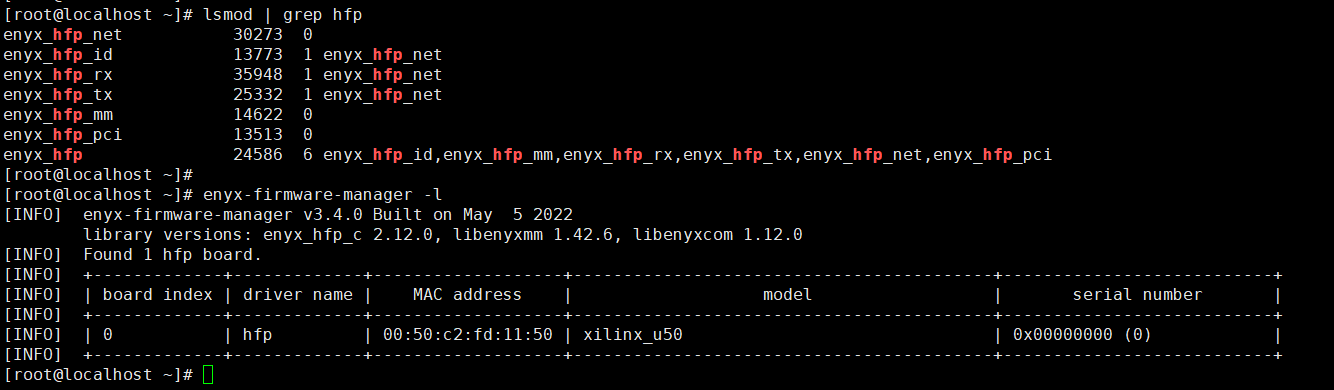
然后执行:
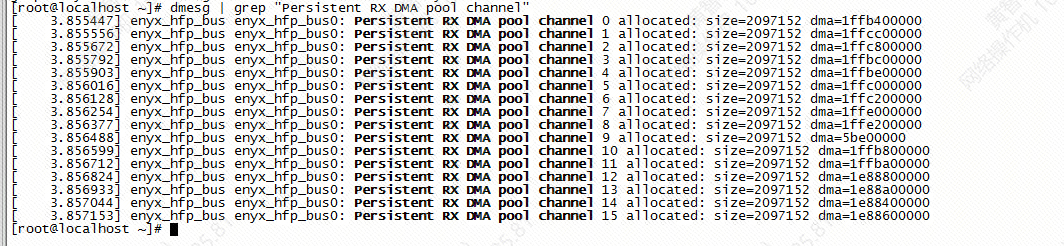
dmesg | grep "Persistent RX DMA pool channel"确认有以下输出代表加载的是DMA空间固定的驱动版本。